RealHub365 Realhub365
Home
Platform Features ▾
Daily Glance™ Mobile Office CRM + Contacts DealTracker Expense Tracker RealHub Social Luxury IDX Websites AI Authority Engine Marketing Tools Lucy
Pricing
Schedule Your Demo
Home
Platform Features
Daily Glance™ Mobile Office CRM + Contacts DealTracker Expense Tracker RealHub Social Luxury IDX Websites AI Authority Engine Marketing Tools Lucy Pricing Schedule Your Demo
Knowledge Base · Featured Listings

Featured Listings

You’ve finally pushed that listing live — now your client wants to see their property on your site. Admins choose the listings featured on the main company homepage, and each agent chooses the listings featured on their own agent subdomain.

Where to Find It

Admin

Go to Website in your RealHub365 menu and open Featured Listing in the submenu.
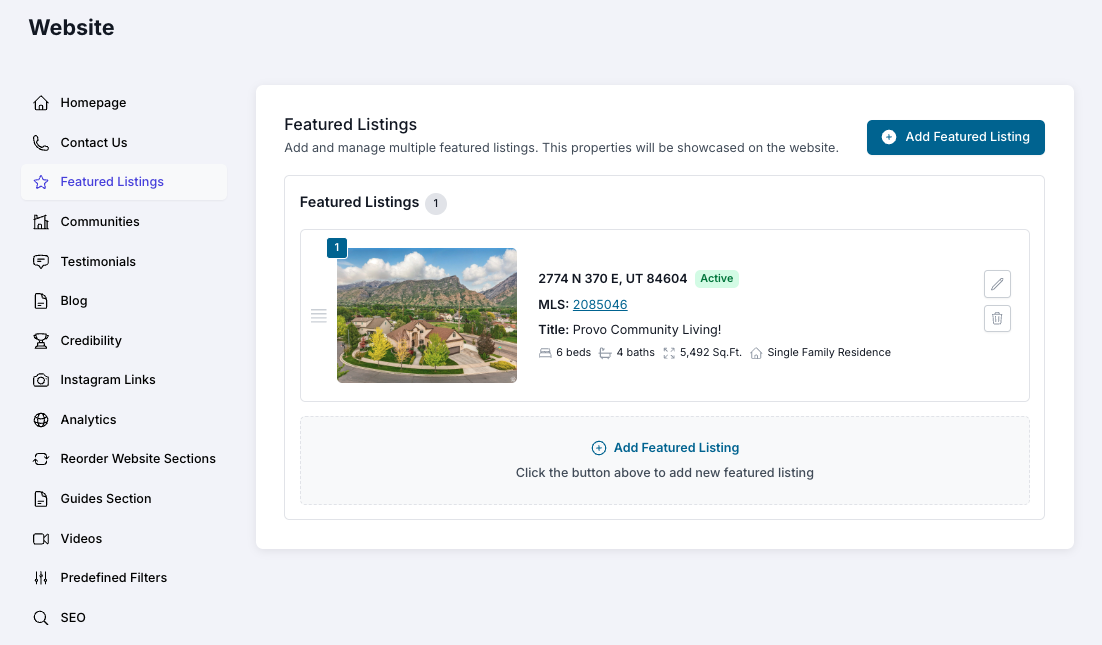
Featured Listing in the Website submenu
Agent

Open your Profile (bottom left corner of the platform) and scroll down to near the bottom for the Featured Listing section.
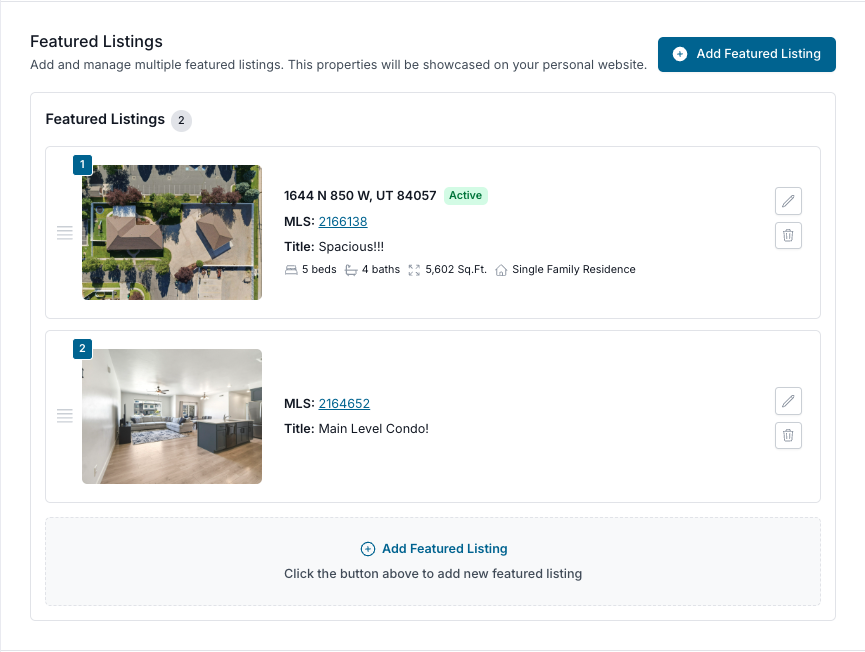
Profile link in the platform
Featured Listing section in the agent profile

Adding a Featured Listing

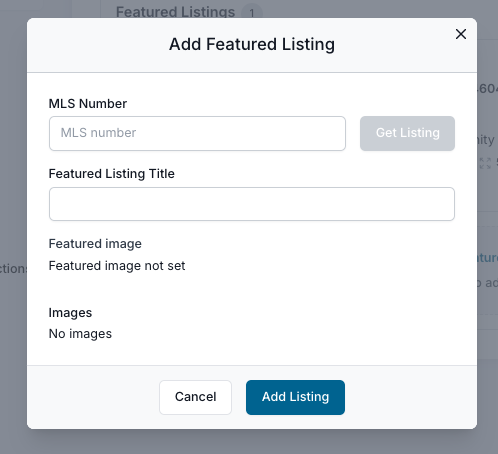
MLS Number

Enter the MLS number of the property you want to feature, then click Get Listing to pull in its images.

Featured Listing Title

Whatever you type here overlays the image in the Featured Listing section.

Featured Image

Select the image you want displayed on the homepage — this step is required.

How Many Can I Display?

As many as you like. But based on how long visitors typically spend on a page, most will only see three or fewer — so put your most important listings first.

No Listings of Your Own?

  • Feature any listing you like by entering its MLS number.
  • Or leave this section empty to mirror the main website — your admin’s featured properties will show on your agent site.
!Important: after making changes to this section, click SAVE at the top.
Save button
RealHub Best Practice

Lead with your strongest three

Most visitors will only see your first few featured listings, so choose a standout photo, write a short title that sells, and keep your top three current.

Next: CommunitiesBack to Main Menu
RealHub365 Realhub365
One connected platform for the business of real estate.
AI-powered. Mobile-first. Built by brokers.
Opportunity to close — in one login.

Platform

  • Daily Glance™
  • Mobile Office
  • CRM + Contacts
  • DealTracker


  • Expense Tracker
  • RealHub Social
  • Luxury IDX Websites
  • AI Authority Engine
  • Marketing Tools
  • Lucy
  • Pricing

Company

  • Why RealHub365
  • Teams & Brokerages
  • Industry News
  • Schedule a Demo

Support

  • Contact Sales
  • Tech Support

Legal

  • Privacy Policy
  • Terms of Use
  • Terms of Service

Contact

  • sales@realhub365.com
  • 800-883-5676
RealHub365 LLC © 2026 RealHub365 LLC. All rights reserved.